
Working on some OER Visualisation Project work today I found I needed to get some additional information from an external web service for a Google Spreadsheet I was working on. I could have of course just used Google Apps Script, a native feature within Google Spreadsheets, to do a UrlFetch and get the information but my source data was a bit messy and timeouts on Apps Script prevent you from getting lots of data in one hit. Instead it made more sense to download the data into Google Refine, clean it up, call external web services to get additional information, then somehow get it back into the original spreadsheet.
As I recently posted Integrating Google Spreadsheet/Apps Script with R: Enabling social network analysis in TAGS it wasn’t much of a cognitive leap to try a similar trick of publishing the spreadsheet as a service to allow a basic API write. In the R example, however, I used the POST method to pass data and whilst I’m pretty sure with the right Jython libraries you could do something similar in Refine, I wanted to keep it simple so here’s my method for using GET instead.
- In a Google Spreadsheet open Tools > Script editor.. and paste the following code (there is some tweaking required to where you want the data to go and the secret passphrase – in this example I want to pass back a value named geo
- Once tweaked Run > Setup (this get a copy of the spreadsheet id need to run as a service)
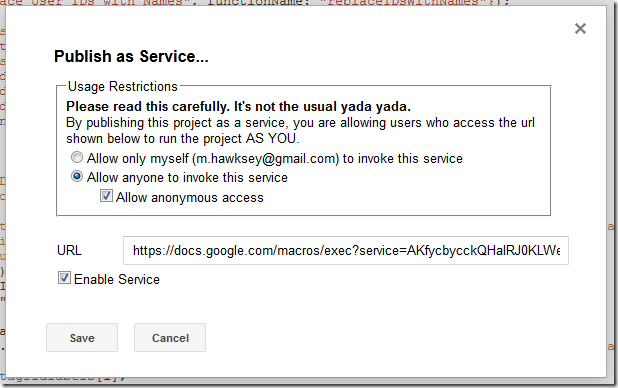
- Open Share > Publish as service.. and check ‘Allow anyone to invoke’ with ‘anonymous access’, not forgetting to ‘enable service’. You’ll need a copy of the service URL for later on. Click ‘Save’
- Back in Google Refine select a column with some data you want to pass and choose Edit column > Add column by fetching URLs…
- The expression you use will be something like the one below where we have the service url from step 3, the ‘secret’ to match the one set in step 1 and what ever data you want to include
"https://docs.google.com/macros/exec?service=AKfycbw1VL_kNYEwhqELgccMgEvM9gJ3t1zhBr6bhLs84g&secret=lemon&idx="+cells['idx'].value+"&geo="+escape(value,"url")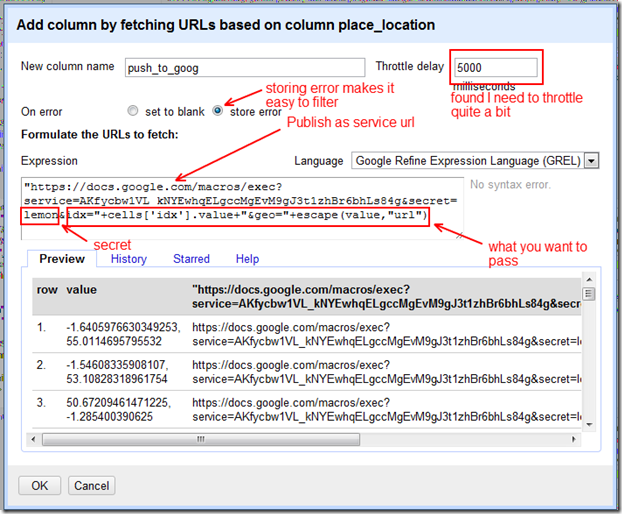

Note: You’ll see from the script my import included an idx number which matched a row number, but as long as I didn’t add any additional rows or change the order I could have used row.index in the expression instead.
You also might want to play around with the throttling. I had problems with my first go because this was either set too low or my values weren’t url encoded.
Instead if anyone finds this useful or if they show how to do in Jython. The amount of Google Spreadsheet work I do I’m sure I’ll use this trick again ;)

Tom Mroris
The safest practice is to get in the habit of URL escaping every single parameter, particularly if it’s coming from a cell instead of being a simple constant string literal that can be inspected. Failing to do this will cause untold grief in debugging URL encoding problems.
Martin Hawksey
Very useful advice – thanks Tom
Martin