
Update: New version of this spreadsheet template here
There’s a new kid on the block if you are considering an open source timeline tools. For a long time the Simile Exhibit Timeline tool has been the tool of choice appearing in places like Freebase.com (click on Timeline in this page to see a history of internet search engines).
A nice feature of ‘Timeline’ is it’s focus on making it easy to embed content from other sites including individual tweets, videos from YouTube and Vimeo, images hosted on Flickr or with a direct url and audio from SoundCloud. Here’s an out-of-the-box example (I tried to use the embed code in this post but it seems to conflict with some of blog theme code (a jQuery problem))
I wanted to try out ‘Timeline’ to see how it preformed under different use cases. The two I had in mind were: Timeline/Google Spreadsheet as a simple OER creation tool (in part influenced by Pat Lockley’s post on using Google Maps as an OER authoring tool); and using Google Spreadsheet’s built-in functions to scrape and automagically publish information into a dynamic timeline.
The first case is fairly easy to do using the template and instructions on the Timeline site (although more complicated than Pat’s example). A couple of ‘gotchas’ for you. When I changed the spreadsheet setting to United Kingdom formats it messed up the dates on the timeline. I also had problems using Google Maps with external KML files (I’ve opened an issue). On to the fun bit though, gluing webservices together to generate dynamic timelines.
The glue – Google Spreadsheet
Because Google Spreadsheet sits in the cloud and has a number of ways to get live data feeds in they are great for gluing data streams together and republishing in different formats. Also as Timeline likes Google Spreadsheets all we need to do is get some data in a format Timeline likes and it should happily start updating itself … in theory anyway.
The data side left me scratching my head a bit. There’s lots of data out there its just finding some with readable timestamps. I had thought about pulling information from Wikipedia but found tables of dates not particularly machine readable. Then I started reading about the @Arras95 event which is happening as part of the JISC funded WW1C project run by the University of Oxford.
Between the 9th April and 16th May 2012 an experiment in social media will take place. We will tweet the events of the Battle of Arras in realtime, from the perspective of a neutral reporter on the field. What makes this Twitter event different from other realtime tweeting initiatives (and there are some great ones out there!) is that @Arras95 will engage online communities, crowdsourcing facts about Arras and the individuals who played a part, asking for reappraisals and additions to the action as it happens.
You can read more about how to get involved in the Contribute. Collaborate. Commemorate. I could just scrape the @Arras95 tweets and put them in Timeline, but where would the fun be in that 😉 Instead I want to capture some of the visual richness. Whilst I could start to unpick media links to videos and images from the official Twitter stream, there’s no need as the social web search site Topsy already does this and the data is accessible via the Topsy Otter API.
More glue – Yahoo Pipes
As Arras95 hasn’t started yet here’s an example call to #ukoer looking for video. The result is in JSON which is usually great for other mashups but unfortunately it’s a format Google Spreadsheet’s doesn’t like (although you can handle it with Google Apps Script, but on this occasion I was trying to avoid that route). Instead I turned to Yahoo Pipes, which hopefully won’t disappear just yet despite Yahoo laying off 2,000 of its staff this week.
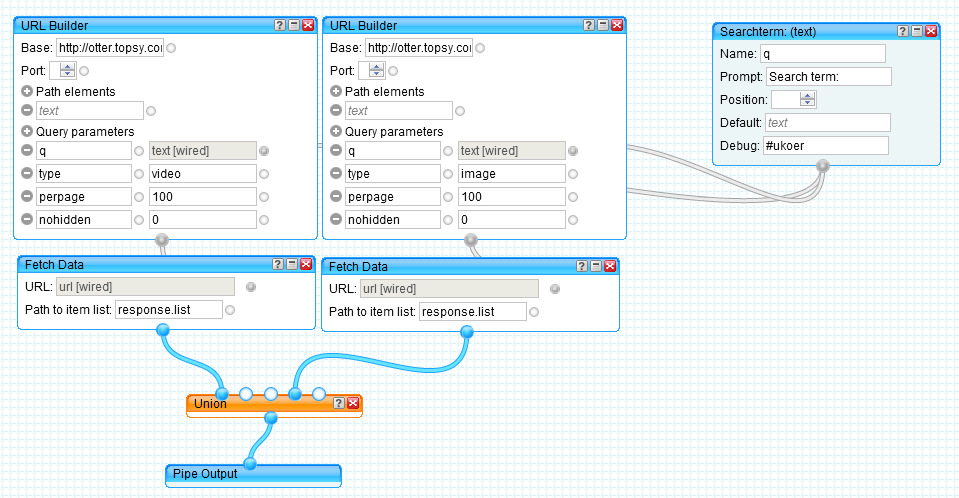
Piecing it together – importing Yahoo Pipes into Google Spreadsheets
From the Timeline site there is a Google Spreadsheet Template. This gives us the format we need to get the data in. For now lets keep working with #ukoer as this gives us some data to play with. Here’s a copy of the template with an extra sheet called data. In cell B1 of the data sheet is the formula:
=ImportData("http://pipes.yahoo.com/pipes/pipe.run?_id=61ef2f4123254106f5acdea3db47d092&_render=csv&q="&urlencode(Readme!B7))
This comes from running the Pipe with a search term and copying the ‘Get as RSS’ link, which is:
http://pipes.yahoo.com/pipes/pipe.run?_id=61ef2f4123254106f5acdea3db47d092&_render=rss&q=%23ukoer

function urlencode(text) {
 return encodeURIComponent(text)
}
Down column A of data there is another custom function to convert entity numbers into characters eg turn ' into apostrophe’s. That particular ditty goes:
function entitydecode(text){
 //http://stackoverflow.com/a/6155669
 return text.replace(/&#(\d+);/g,function(match, number){ return String.fromCharCode(number); });
}
Back in the spreadsheet on the ‘od1’ sheet we start pulling in the bits of data we need for the timeline. This mainly uses ArrayFormulas in row 3 to populate all the data without having to manually fill in the column. For example in D3 we have:
=ARRAYFORMULA(IF(ISBLANK(data!E2:E),"",(data!E2:E/ 86400) + 25569))which reads as ‘if the cell in column E of data is blank do nothing otherwise divide by 86400 and add 25569 (converts Unix epoch times used in the Topsy API into human/spreadsheet readable formats)
Slapping it into a Timeline
All that’s left to do is in the spreadsheet File > Publish to the web… and then find somewhere to host your timeline page. So that you can see what it looks like here’s one for #ukoer.

@Arras95 Living Timeline
Here is the @Arras95 timeline and the source spreadsheet.

Nothing much to see now apart from a test tweet. The theory is that this will self populate over time as data filters into Topsy. It’ll be interesting to see if it actually works or if I need to set up a Apps Script trigger for force a refresh.
If you would like to make your own dynamic timeline from tweeted media here’s:
*** The Topsy Timeline Template ***
[File > Make a copy to use]

Mark Notess
Interesting. Do you happen to know of an open source timeline tool that puts time on the *y* axis (such as Facebook’s timeline)? The horizontal scrolling just isn’t great in a browser (IMO).
Martin Hawksey
Hi Mark,
Afraid I don’t know of anything existing. It may be relatively easy to modify the code of this tool. It still in development so you might want to put a feature request in via their site
Martin
steve white
is there any way to set it to start at a particular time, looked at verite site don’t see it specified
Martin Hawksey
Hi Steve – not that I know of (first project with this tool still learning my way around it)
Martin
Sam
Hi Martin – great post. Is there a way one could modify the Topsy template or Yahoo Pipes to work with a different API? For example mention of a search term on a Tumblr blog or on Pinterest?
I can get the Tumblr API to output a good JSON feed of a particular blog I would like to study via Timeline, but can’t quite seem to get it to pull though in Yahoopipes or a Google Spreadsheet as you have done (see the JSON output here: http://api.tumblr.com/v2/blog/peacecorps.tumblr.com/posts/text?api_key=PyezS3Q4Smivb24d9SzZGYSuhMNPQUhMsVetMC9ksuGPkK1BTt¬es_info).
Martin Hawksey
Hi Sam – might be you need to define ‘path to item list’ in Pipes. See http://pipes.yahoo.com/pipes/pipe.info?_id=4996a40929539503d415d74e693e097a which feeds into https://docs.google.com/spreadsheet/ccc?key=0AqGkLMU9sHmLdEt1aHMwTW1ydHI0bm1tU05WVFdEZWc#gid=0
Martin
Sam
Martin, this is excellent – just what I needed – thank-you for filling in that missing ingredient! I am going to push a few more JSON analyses into the loop now, and see what comes out, then do a write-up. Possibilities for this are endless. Help appreciated.
Sam
On another, simpler note, I managed to modify your Yahoo Pipes to get a pretty decent feed into my Google Spreadsheet (see here:
https://docs.google.com/spreadsheet/ccc?key=0Al135Uzr-xDZdE5PRDVIT3ZCNF9Za0o5cHJKN08xN2c)
Only problem is when it renders in Timeline, it seems to be missing the first navigation arrow – any ideas?
http://twitterabused.com/timeline-hungergames-tweets/
Thanks.
Sam
Martin Hawksey
Hi Sam – on this one I think it might be because there is no minimum date/time in cell A2
Martin
Sam
Thanks for that Martin. Looks great in Firefox now, though I suspect there is a bug in Chrome and Safari on the Mac. I have been testing a way of embedding it in respective WordPress blogs, with a few plugin workarounds to get around the jQuery issue, so will post in the next few days.
Sam
Martin Hawksey
@sam Great stuff, look forward to reading how. (PS I’ve found the developers to be very responsive to fixing bugs when submitted as an issue ticket
Martin
Sam
Cheers for that Martin, and finally, my post, with the “How to” near the end of it (and under the timeline you helped bring into fruition): http://twitterabused.com/2012/04/12/pintrest-scraperwiki-and-didnotreport-campaign/
Sam
Revisiting: Experiment to dynamically timeline media posted on Twitter using Topsy and Timeline – JISC CETIS MASHe
[…] Tags: #cam12. Share this post on: Google+ | Facebook | Twitter | LinkedInRecently I posted an Experiment to dynamically timeline media posted on Twitter using Topsy and Timeline (my contribution… which uses a Yahoo Pipes to extract tweets with images and videos using the Topsy Otter API, which […]
#ididnotreport: Life of a Twitter Meme across social network platforms Twitter Abused
[…] network data, I was fortunate enough to come across Martin Hawksey’s originating post “Experiment to dynamically timeline media posted on Twitter using Topsy and Timeline (my contribution…“. In this, he discussed how one could utilise data pulled from the Topsy.com social search […]
Creating a timeline: Dipity at Danegeld
[…] Timeline. Lots of articles about Timeline (Mashable | Journalism.co.uk | The Event Amplifier | mashup from MASHe), which compare it to Storify, not sure why. Doesn’t have a drag n drop interface (fine by […]
Programme timelines « JISC Curriculum Design & Delivery
[…] twitter that have been tagged with #jisccdd (thanks to my colleague Martin Hawksey for creating the template to do […]
Sheila’s work blog » #jisccdd timelines
[…] twitter that have been tagged with #jisccdd (thanks to my colleague Martin Hawksey for creating the template to do […]